
Download WebDwarf – web page authoring tool, drag-and-drop interface, pixel-perfect design, FTP publishing, WYSIWYG editor, image editing, text editor, web design software, mobile web development, web creation app
Overview
WebDwarf, developed by Virtual Mechanics, is a mobile application designed to bring web page authoring capabilities directly to smartphones and tablets. As a productivity tool, it aims to empower users to create and publish professional-grade web content from mobile devices. The app is particularly useful for individuals who need to design and update websites on the go, whether they are students, freelancers, or small business owners managing their online presence. Its core purpose lies in simplifying the process of web development through intuitive tools that reduce reliance on desktop software.
WebDwarf addresses the growing demand for mobile-first web creation by offering a WYSIWYG (What You See Is What You Get) interface that allows users to visualize their designs in real time. This functionality enables both beginners and experienced developers to build visually accurate layouts without deep coding knowledge. The app supports essential web design tasks such as image editing, text formatting, and link management, making it a versatile tool for content creators. By integrating FTP publishing, it streamlines the final step of website deployment, eliminating the need for external tools.
Although the developer did not provide additional technical details about the app’s architecture or underlying technologies, its release date of February 2, 2015, indicates it was among early mobile web development tools. Despite its age, WebDwarf remains relevant for users seeking a lightweight, free solution for mobile web creation. Its presence in the productivity category underscores its utility as a functional tool rather than a full-featured development environment.
Key Features & Functionality
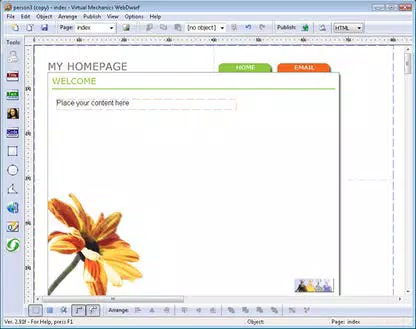
- WYSIWYG Drag-and-Drop Editor: The app features a visual editor that allows users to position elements with pixel-level precision. This functionality enables real-time design adjustments, ensuring that layouts match intended specifications. For example, a user can place a navigation bar, image gallery, or contact form exactly where needed without writing HTML or CSS.
- Integrated Graphics Creation: WebDwarf includes a built-in graphics editor for creating basic shapes such as rectangles, ellipses, and polygons. Users can apply shading, transparency, and color gradients directly within the app, reducing the need to switch between design tools. This feature is especially helpful for creating custom icons or banners on mobile.
- Advanced Link Management: The software automatically generates hyperlinks when a URL is typed, simplifying the process of adding navigation and external references. Users can also review and edit all links through a centralized interface, ensuring consistency and functionality across pages.
- Built-in FTP Client: One of the app’s standout features is its integrated FTP publishing tool. Users can upload completed web pages directly to their hosting provider with minimal setup. The 'Gather' function ensures all associated files—including images and scripts—are bundled and transferred together, preventing broken links post-deployment.
- Comprehensive Support Resources: Virtual Mechanics provides documentation and tutorials to assist users in mastering the app. These materials are valuable for beginners learning web design principles while also serving as quick references for experienced users tackling specific tasks.
Interface, UX & Performance
The user interface of WebDwarf is designed around simplicity and efficiency. The layout follows a clean, intuitive structure that prioritizes accessibility, allowing users to navigate between design, editing, and publishing modes with minimal friction. Visual elements such as toolbars, preview panels, and file trees are arranged to minimize clutter while maintaining functionality.
Navigation is consistent across screens, with clear icons and labeled menus that guide users through the workflow. The drag-and-drop functionality is responsive, enabling smooth interaction even on lower-end devices. Although the developer did not list formal performance metrics, the app’s 12.3 MB size suggests a lightweight footprint, which likely contributes to stable operation across various Android devices.
Responsiveness is a key strength, particularly during real-time design adjustments. Users can expect minimal lag when moving elements or applying formatting. Stability appears to be maintained, as the app has remained available since its 2015 release. However, compatibility with newer Android versions may be limited due to the app’s age, though no specific requirements were listed.
Platform Compatibility & Technical Requirements
WebDwarf is available on the Android platform and requires a compatible device running the specified OS version. The app has a file size of 12.3 MB, making it suitable for devices with limited storage. It is offered as a free download, with no in-app purchases or subscription fees reported.
The developer did not specify minimum OS requirements, nor did they list compatibility with specific device models or screen sizes. This lack of detail means users should exercise caution when installing on newer Android systems. While the app may function on recent devices, there is no guarantee of full compatibility or security updates. Users are advised to check their device’s settings for app installation permissions, especially if the app is downloaded from third-party sources.
Pros and Cons
Pros
- Free to download and use with no hidden costs
- Offers a WYSIWYG drag-and-drop interface for intuitive web design
- Includes built-in FTP publishing for seamless website deployment
- Features integrated image editing and text formatting tools
- Supports pixel-perfect layout design without coding
Cons
- Released in 2015; may lack support for modern Android features
- Specific OS requirements were not disclosed
- No official updates or maintenance information provided
- Limited information on device compatibility and performance on newer hardware
- May not support advanced web development standards or responsive design frameworks
FAQ
Is WebDwarf safe to download and install?
Yes, the app is available as a free download from official sources. However, users should ensure they install it from trusted platforms to avoid potential security risks.
Can I use WebDwarf to publish websites directly from my mobile device?
Yes, the app includes a built-in FTP client that allows users to publish web pages directly to their hosting provider.
Does WebDwarf require coding knowledge to use?
No, the app is designed for users with no coding experience. Its drag-and-drop interface and WYSIWYG editor eliminate the need for manual HTML or CSS writing.
Is WebDwarf compatible with all Android devices?
The developer did not specify compatibility details. While the app may work on many devices, full functionality on newer Android versions cannot be guaranteed.
Are there any updates or support for WebDwarf?
As of the provided information, no recent updates or active support channels have been listed. Users should expect limited maintenance.
Final Thoughts
WebDwarf stands out as a pioneering mobile tool for web page creation, offering a surprisingly capable set of features for a free app released over a decade ago. Its drag-and-drop interface, integrated FTP publishing, and built-in design tools make it a practical choice for users who need to create and publish web content on the go. While its age raises concerns about modern compatibility, the app’s lightweight design and core functionality remain relevant for basic web development tasks.
It is most beneficial for beginners exploring web design, educators demonstrating digital content creation, or professionals managing simple websites from mobile devices. For those seeking a straightforward, no-cost solution to build and publish web pages without desktop software, WebDwarf delivers tangible value.
Despite its limitations, the app remains a viable option for specific use cases. Download WebDwarf now to explore mobile web development in a simple, accessible way.


